
SaaS Analytics Dashboard Dark Mode — GPT Image 2 Prompt & Example
Prompt Used
Original technical prompt, kept as-is for reproducible generation.
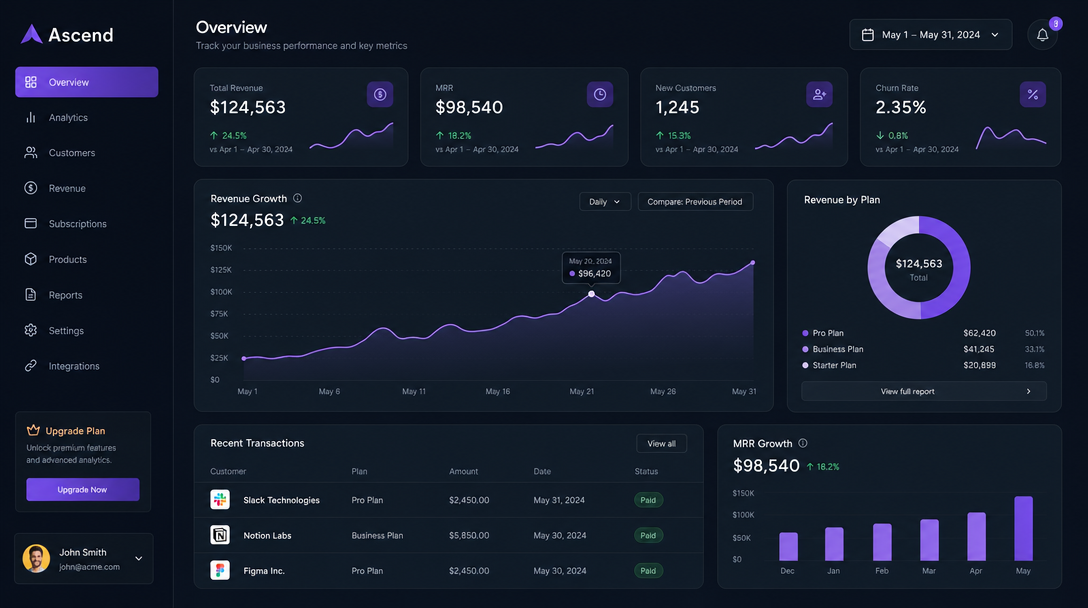
Modern SaaS dashboard UI design, dark mode, analytics charts showing revenue growth, clean typography, purple accent color, professional minimalist layout, web app interface
Share this image
Generation Parameters
- Model
- GPT Image 2
- Aspect Ratio
- 16:9
- Category
- UI & Design
Tags
Styles
About This Image
Modern SaaS dashboard with analytics charts and revenue growth visualization in dark mode. This example demonstrates GPT Image 2’s capability for UI/design mockup generation, showing how the model handles UI & Design content with accuracy and detail.
Prompt-writing tips from this example:
- •Be specific about the subject — this prompt names “SaaS Analytics Dashboard Dark Mode” directly, giving the model a precise visual target.
- •Include style cues such as “ui-design” to guide the visual treatment.
- •Set generation parameters explicitly (Aspect Ratio: 16:9) to control output dimensions and fidelity.
GPT Image 2 can render interface layouts, device frames, and dashboard mockups with clean visual hierarchy for design exploration. GPT Image 2 follows layered instructions closely, so complex prompts like this can turn into final images with fewer revisions. Similar prompts work best with GPT Image 2 Ultra quality.
More Like This



Want to generate images like this?
Start with GPTImager at $9.95/mo* — 500 credits, 4K upscaling, commercial license, and a 7-day money-back guarantee.
Get Started — $9.95/mo* →* Starter plan: $9.95/month when billed annually ($119.40/year) or $19.90 month-to-month.